FM and maintenance companiesBuilding maintenance and reactive M&EProperty and estatesTrusts, schools and collegesOff spreadsheets and WhatsApp

Every school one view.

You answer for every school in the trust. docket gives your estates team one place for repairs, safety checks and certificates, and gives each school only what’s theirs.

Book a demo£35 per person, everything in

Sound familiar?

✕

Every school reports repairs its own way.

✕

Certificates live in each school’s inbox and shared drive.

✕

When the board asks if every school is safe, you start ringing round.

✕

Tap temperatures get written down, then typed into a spreadsheet nobody checks.

Who sees what

One docket for the trust. Each person sees the part they answer for.
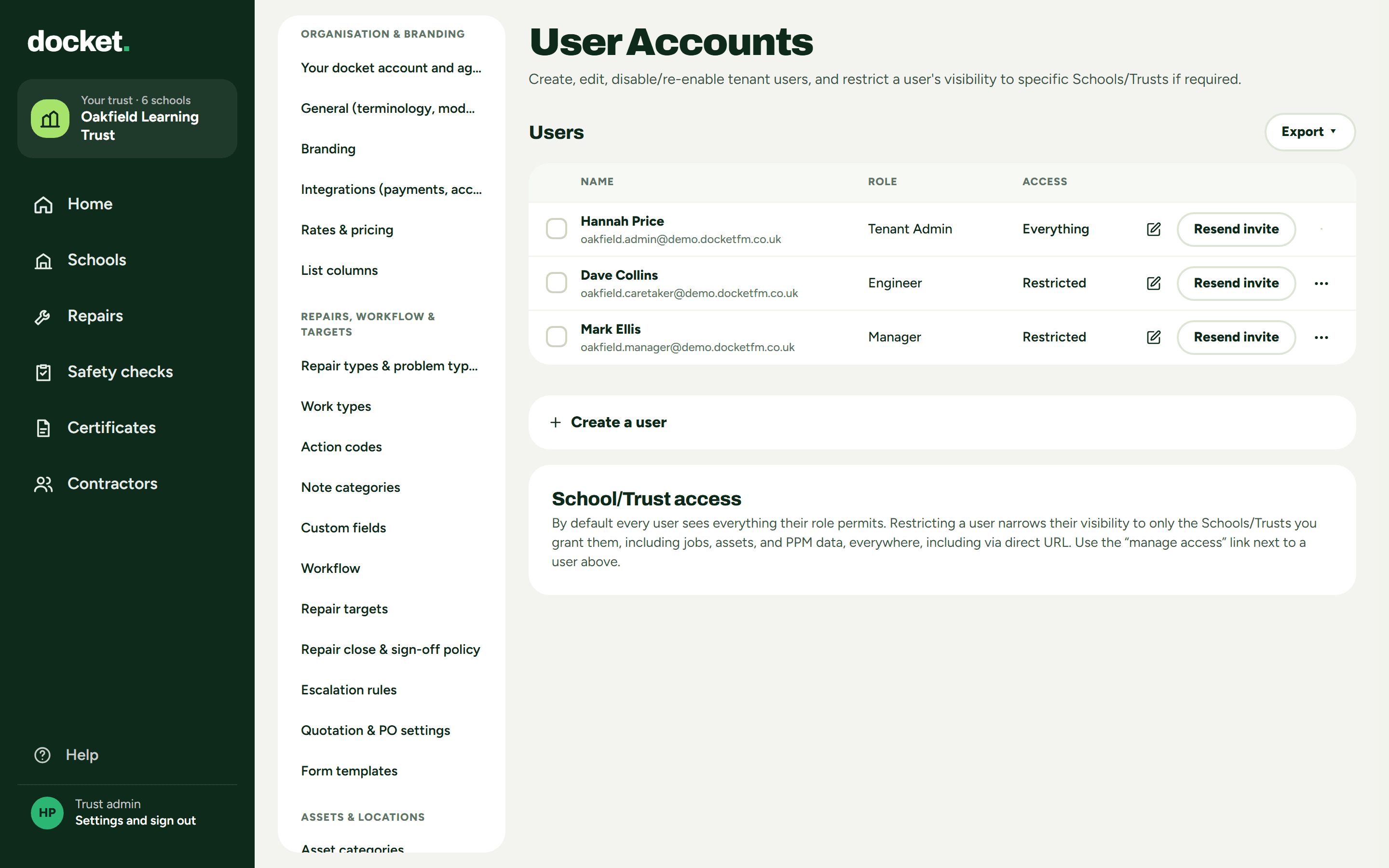
1Trust adminEvery school at once. Repairs, safety checks, certificates and contractors across the trust.
2Site managerLimit them to their school, and they see only that school, nothing from the others in the trust.
3CaretakerA phone view with three tabs: Today, Problems found and Me.
Trust admin: User Accounts, showing Everything and Restricted access
Real screen: trust admin, User Accounts. The admin sees everything; the site manager and caretaker are restricted.
In your words

Repairs, not jobs. Schools, not sites.

The words on screen fit a school estate, so nobody has to translate.
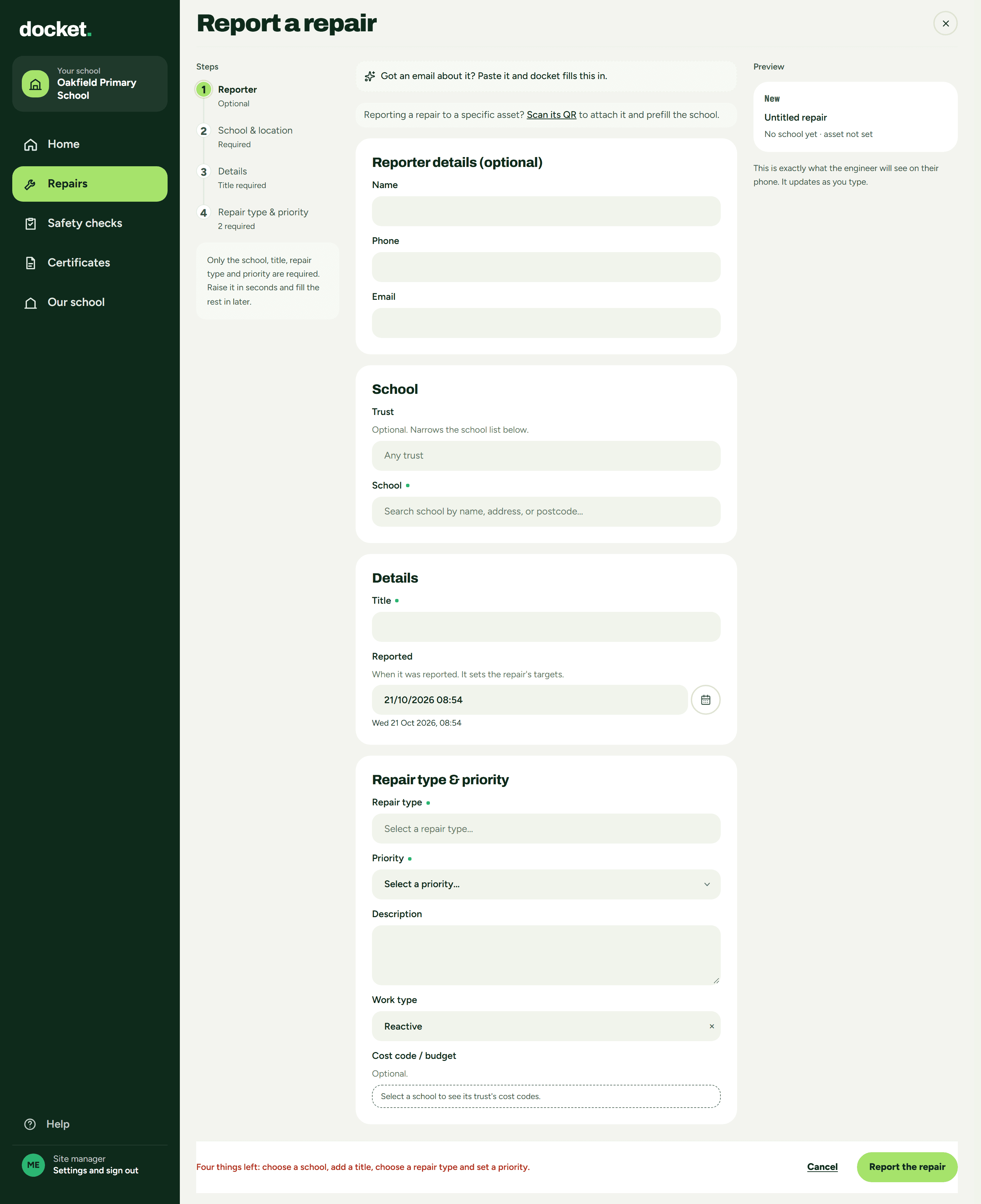
RepairsSchoolsSafety checksRoutine checksCertificatesProblems foundUrgent
Site manager: Report a repair at Oakfield Primary School
Real screen: site manager, Report a repair, limited to their own school.
The caretaker’s phone

The job is already theirs.

Caretakers open docket on their phone and see Today, Problems found and Me. There is no accept or decline, because the work is already theirs. It works on any phone, with nothing to install.
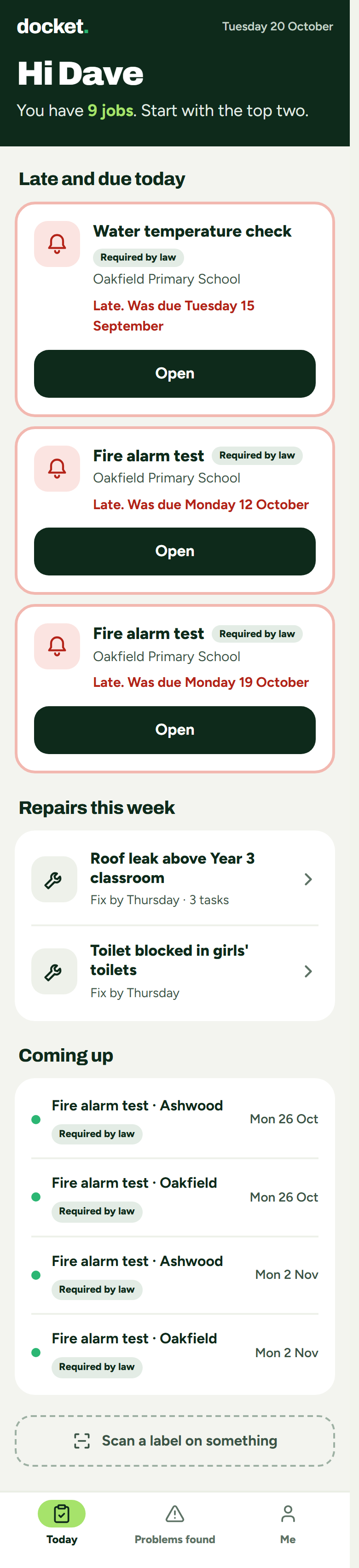
Caretaker on a trust, Today: late safety checks tagged Required by law, repairs this week, and the Today, Problems found and Me tabs
Real screen: caretaker, Today. Today, Problems found and Me along the bottom.
Safety checks and certificates

Every certificate on the school it belongs to.

Safety checks the law requires are tagged, so they stand out from routine checks.
Safety checksRequired by lawRoutine checks
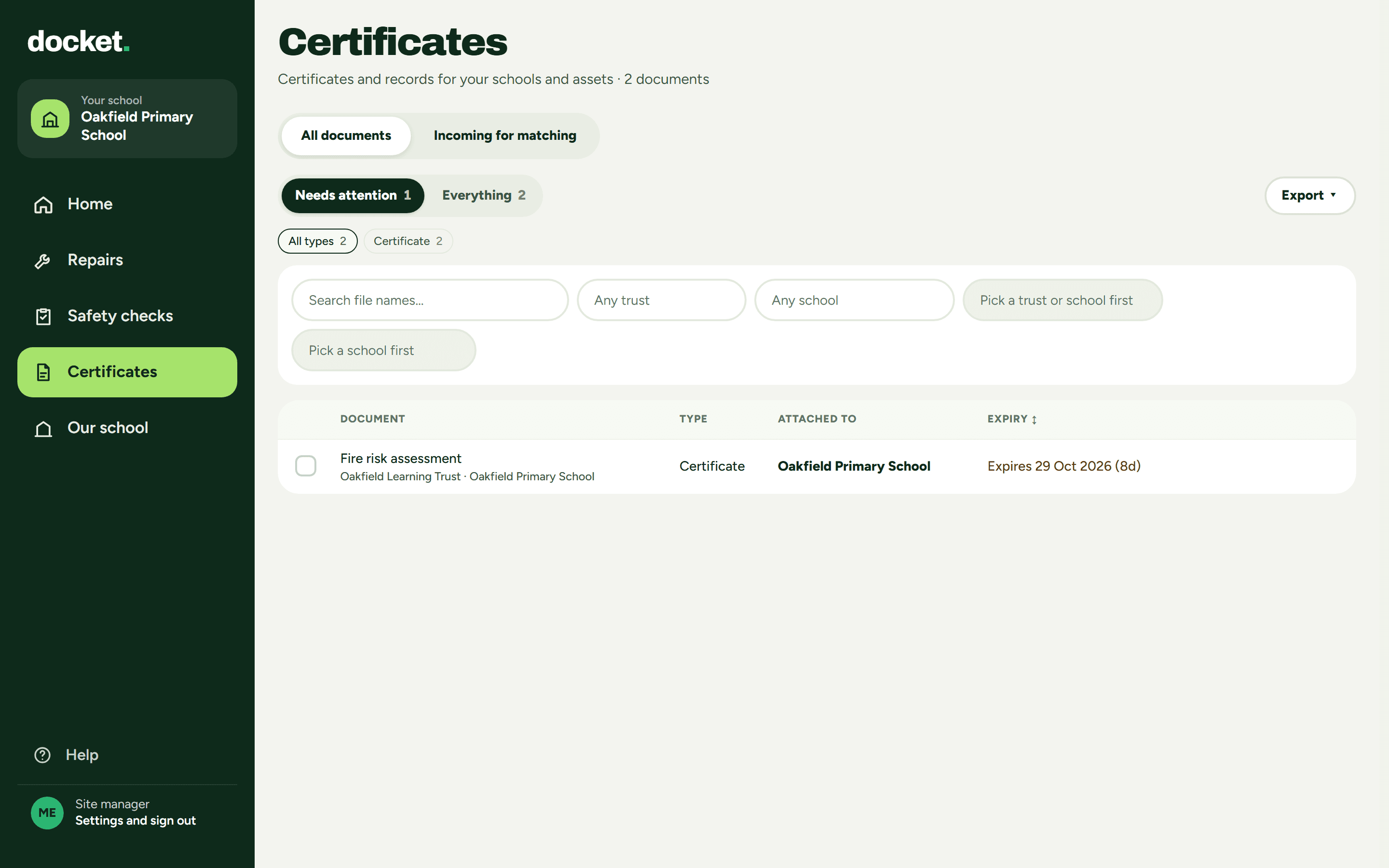
✓Certificates filed against the school and the asset
✓Expiry reminders before a certificate runs out
Site manager: Certificates for Oakfield Primary School, a fire risk assessment attached to the school, expiring 29 Oct 2026
Real screen: site manager, Certificates. Filed against the school, with its expiry.
Contractors

Their insurance, under Contractors.

Each contractor’s insurance sits with them under Contractors. With the block on, anyone missing a mandatory document can’t be given new work unless an admin overrides it with a reason. You can chase it from the same list.
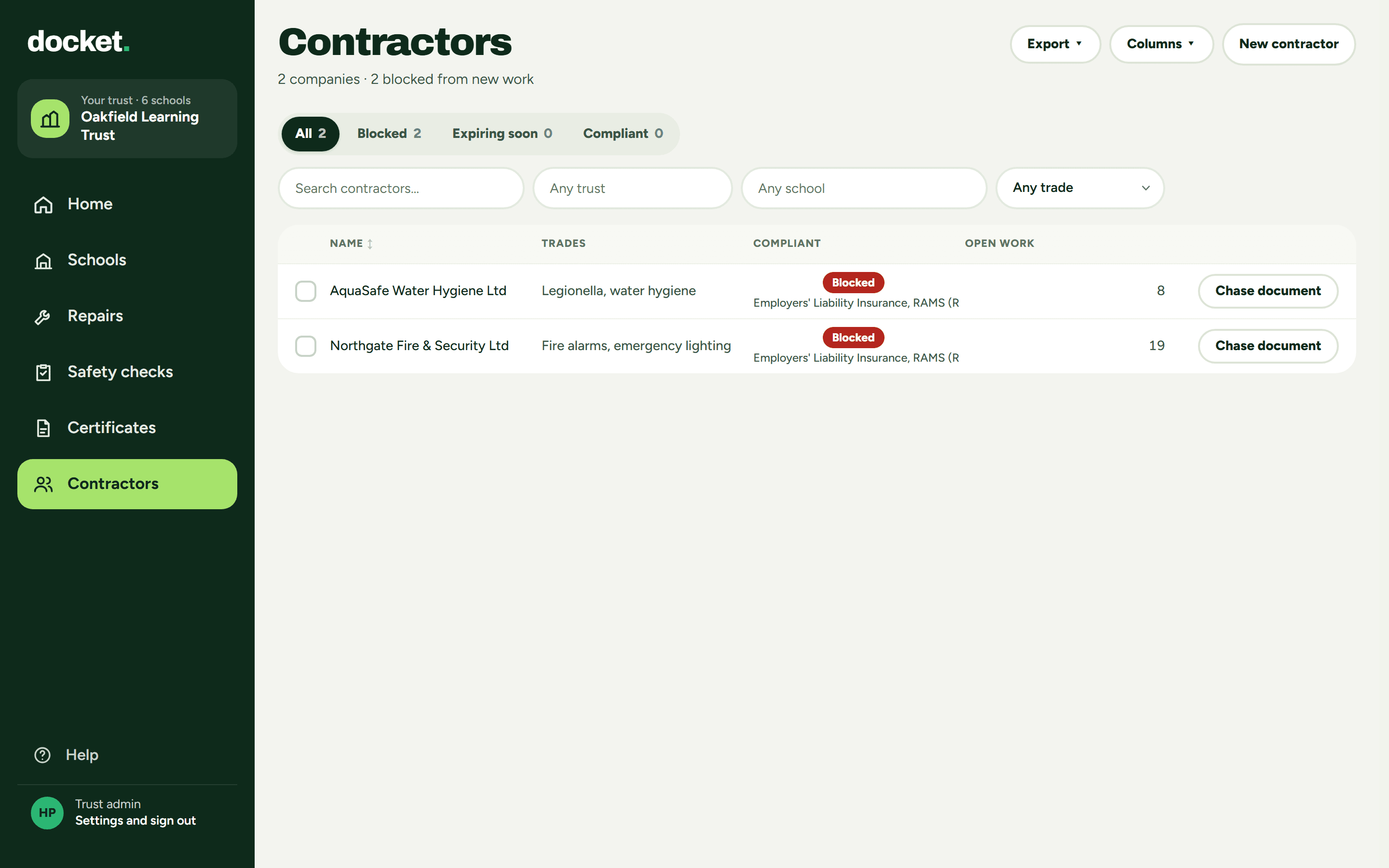
Trust admin: Contractors, with missing insurance flagged
Real screen: trust admin, Contractors. Missing insurance flagged.

The money.

£35a person a month, for everyone at the trust who logs in, whichever screen they use.
✓Estates team, site managers, caretakers and anyone else at the trust all count
✓Contractor logins are free and never counted
✓Everything included.
Worked example10 schools, each with a site manager and a caretaker.
£700 a month20 people at £35 each
The 60 days come first, with no commitment. The 12-month term starts only after that, and only if you carry on.How the 60 days work →

Straight answers.

Can a site manager see other schools?

Only if you let them. Limit a site manager to their school, and they see only that school. The trust admin sees every school.

Do caretakers have to accept their jobs?

No. A caretaker’s job is already theirs, so there is nothing to accept or decline.

Do contractors need a paid login?

No. Contractor logins are free and never counted.

Where is our data held?

In the EU, with a daily encrypted copy held offsite in the EU.

Where to start

Every school answered.

Book a demo and we set you up, free. The 60 days come first, with no commitment.

Book a demo

The Docket.

FM news in five minutes, every Friday. One useful thing, one blunt opinion. No sales emails.

We only use your email to send The Docket. Unsubscribe any time. Privacy